


Weather Live: Weather Forecast
4.6970.00 Reviews
App Specs
- Version
- 1.9.8
- Updated On
- License
- Free
- Downloads
- 10,000,000+
- Developer
- KUCO Apps
- Categories
- Weather
- Platform
- Android, iOS
Screenshots
 Analysis by AppCompare
I find the value of a weather app in the small decisions it helps me make: whether to take a coat, leave earlier, or move a plan indoors. Checking several sources or trying to interpret a vague forecast adds friction to an ordinary morning. Weather Live: Weather Forecast brings current conditions, forecasts, and a radar map together, so I can start with one quick check and look closer only when the day calls for it.
That does not mean I treat any forecast as a promise. Weather can shift, and a phone screen cannot replace local judgement during genuinely hazardous conditions. For everyday planning, though, I want a clear overview first and useful detail nearby. This app is aimed at that middle ground: accessible enough for a quick glance, with more to explore when I need to decide whether a change in the sky will affect my plans.
A quick setup that pays off
On first use, I would start by checking the displayed location and choosing the temperature and distance units I actually use. That small bit of setup prevents a familiar annoyance: having to mentally convert a forecast every time I open it. If I regularly care about another place, adding it to the locations I follow makes the app more useful than repeatedly searching for the same destination.
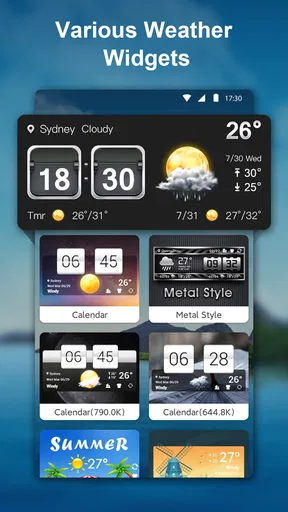
Then I would place a widget where I naturally look before heading out. The point is not to fill the home screen with weather information; it is to make the one detail I need—today’s conditions or the forecast—available without an extra trip into the app. A widget is most helpful when it replaces a habit, such as opening a browser every morning, rather than becoming another screen to check out of routine.
Useful when plans have moving parts
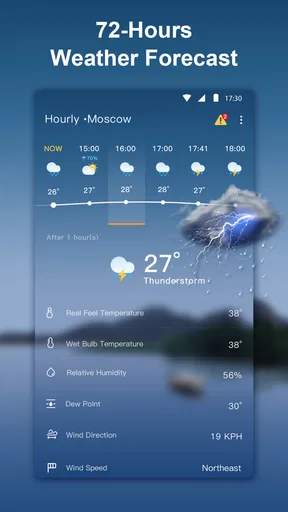
The hourly view is the one I would consult when timing matters more than the general outlook. If I am deciding whether to walk the dog before work or after dinner, a day-level forecast can be too broad to guide that choice. Looking at the hours lets me compare the likely conditions around each window instead of guessing from the morning sky. I would still leave some flexibility when plans depend on the weather, but this is a practical way to avoid being caught out by a change later in the day.
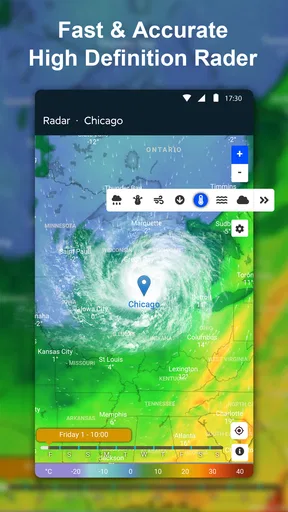
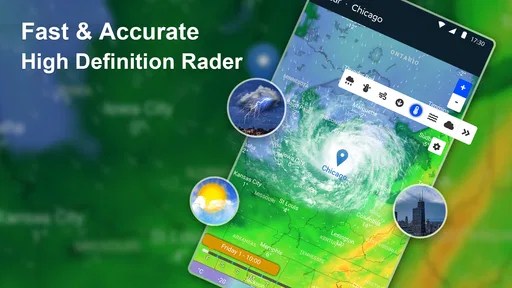
The radar has a different job. I use it to get a sense of where weather is moving, not to assume that a map can tell me exactly what will happen at my doorstep. Before a bike ride, an outdoor lunch, or a drive, that broader view can help me decide whether to go now, wait, or bring a backup plan. It is especially useful when current conditions look fine but the next few hours are less certain.
For a realistic routine, imagine leaving home for a commute while the weather is unsettled. I can glance at the current conditions, check the hours around my return trip, then use radar if rain appears likely. That sequence is more useful than staring at an all-day summary: it turns the forecast into a decision about an umbrella, a different departure time, or a change of plans. The alert option can provide another prompt for severe weather, while common sense and local warnings should remain part of the plan.
Worth Reading Before You Choose

Baby Panda World Brings Quick Play to Modern Phones, but Its Game Library Feels Busy

ESPN’s Live Game View Makes Following Close Games Easier

QuizzLand Review: A Good Fit for Short Trivia Breaks, Not Every Player

Basketball Stars: Multiplayer Is Fast, but Can It Recover When Matches Go Wrong?

WEBTOON Turns Phone Updates Into a Better Reading Routine

Link to Windows Runs on Shared Habits, Not Social Feeds
What it does well—and where I would be cautious
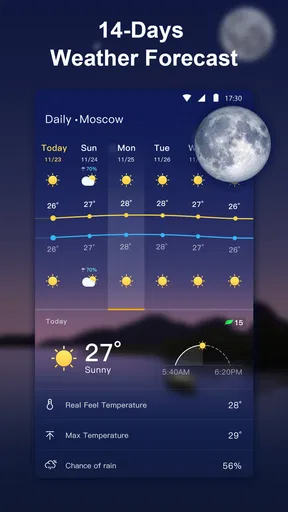
The main convenience is having several levels of detail in one place: a fast snapshot, an hourly view, a week-ahead outlook, and a map. I do not have to begin with the most complicated screen every time. On a normal day, the overview may be enough; when a weekend plan depends on conditions, I can move into the forecast and radar. That layered approach is more useful to me than an app that either hides detail or puts every measurement in front of me at once.
There are trade-offs. A forecast covering several days is best treated as a planning guide, not a guarantee for a specific hour, and a radar image requires interpretation. Animated visuals make conditions easier to scan, but they are not a substitute for reading the information that matters to my plans. I would also avoid relying on a weather app alone for decisions where safety is at stake; severe-weather alerts are helpful, but I would check appropriate local guidance if conditions become dangerous.
Compared with the basic weather screen that comes with a phone, Weather Live is appealing if I want radar and a more deliberate way to browse hourly and daily outlooks. If all I ever need is the temperature before stepping outside, the built-in option may be quicker and simpler. If I follow several places, travel, or often make outdoor plans, the ability to check multiple locations can be a better fit than repeatedly searching elsewhere. The right choice depends on whether those extra views save me time often enough to justify another app.
Who should make room for it
I see this as a good fit for people whose plans change with the weather: commuters, dog walkers, parents arranging outdoor activities, and anyone who checks conditions in more than one place. It is also approachable for someone who does not want a technical weather dashboard but still wants more than a single temperature reading. On the other hand, if you need specialist forecasting for work, outdoor operations, or serious weather analysis, I would choose a dedicated professional source rather than assume a general-purpose app covers every need.
Practical questions are easy to settle through use. Can I check another city? Yes: the app supports multiple locations, which is handy for a trip or keeping an eye on home while away. Can I see whether conditions may change during the day? The hourly forecast and radar give two different ways to assess that. Can I avoid opening the app each time? A home-screen widget offers a quick glance. I would use these tools selectively: a location list for places I truly follow, a widget for a glanceable overview, and the map when movement or timing matters.
A weather tool, not a weather guarantee
Released in 2020, this free weather app is made by KUCO Apps and is rated for Everyone. It has a 4.6 average from around 82,000 ratings, with over 10 million installs, which suggests that many people have found a reason to keep it in their routine. Version 1.9.8 supports Android 7.0 and later. Those details make it accessible to a broad range of Android users, while the central question remains personal: do its extra views help you make everyday decisions more easily?
Ever been caught in unexpected rain without an umbrella or missed out on a gorgeous sunny day? Yeah, me too! That’s where Weather Live: Weather Forecast comes in. It’s like having a personal meteorologist right in your pocket, offering timely weather updates and helping you plan your day around Mother Nature’s whims.
Your Personal Weather Station
When you first open Weather Live: Weather Forecast, you’re greeted with an intuitive interface that makes checking the weather feel like a breeze. The app’s design is clean and straightforward, which is something I really appreciate. No need to sift through unnecessary jargon—everything you need is right there, laid out beautifully.
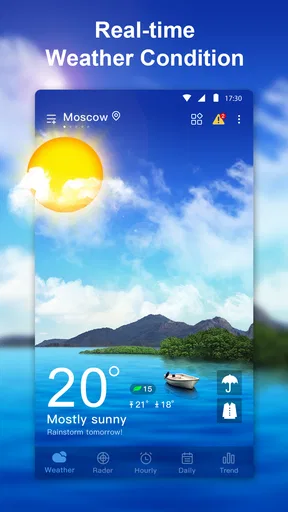
The homepage gives you a snapshot of the current weather conditions. You’ll see the temperature, humidity, and wind speed, all at a glance. But what really sets it apart is the dynamic weather animations. It’s like a little window to the outside world, showing you what’s happening out there in real time. A small touch, but it makes the whole experience more engaging.
Digging Deeper
For those of us who like to dive into the details, the app doesn’t disappoint. You can swipe to see an hourly forecast, which is super handy if you’re planning a day out. There’s also a daily forecast that spans the upcoming week. It’s detailed enough to help you decide if that barbecue on Saturday is a good idea or if you should prepare for a Netflix marathon instead.
One feature I found particularly useful is the weather map. You can zoom in to check out the radar and see how weather patterns are moving. It’s like having a mini Doppler radar in the palm of your hand. Plus, the app offers alerts for severe weather conditions, which is a lifesaver if you live in an area prone to sudden changes.
Customization and Widgets
Now, let’s talk about customization. Because who doesn’t love making an app feel like it’s truly theirs, right? You can tweak the settings to display information in the units you’re most comfortable with, whether it’s Celsius or Fahrenheit, kilometers or miles.
And let’s not forget about the widgets. You can add them to your home screen for quick access to the current conditions and forecast without even opening the app. It’s perfect for those mornings when you’re in a rush but still need to know whether you should grab a jacket or sunglasses.
Worldwide Coverage
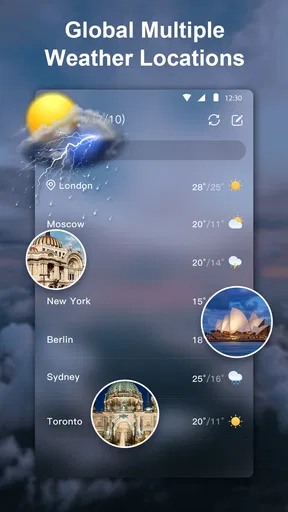
One of the best things about this app is its global reach. Whether you’re traveling across the country or halfway around the world, Weather Live: Weather Forecast has got you covered. You can check the weather for multiple locations, which is especially handy if you’re planning a trip or just want to see how things are back home.
Final Thoughts
All in all, Weather Live: Weather Forecast is more than just a weather app—it’s a reliable companion that helps you stay ahead of the weather. Whether you’re a casual user or a weather enthusiast, it offers the perfect blend of simplicity and detail.
If you’re looking for an app that provides accurate forecasts with an easy-to-use interface, I’d definitely recommend giving this one a try. It’s got all the features you’d want and then some, wrapped up in a package that’s both functional and visually appealing. So next time you’re planning your day, let this app be your guide to navigating the great outdoors.
Pros
- Accurate real-time weather updates.
- User-friendly interface and navigation.
- Customizable weather alerts.
- Detailed 7-day weather forecast.
- Interactive radar maps available.
Cons
- Ads can be intrusive at times.
- Some features require premium subscription.
- Occasional loading delays in app.
- Battery usage can be high with GPS.
- Limited widget customization options.
FAQs for Weather Live: Weather Forecast
What features does Weather Live: Weather Forecast offer?
Weather Live offers a comprehensive suite of features including real-time weather updates, detailed forecasts, and interactive weather maps. Users can access hourly, daily, and 7-day forecasts, as well as severe weather alerts. The app also provides additional data such as humidity levels, wind speed, and UV index to ensure you're fully prepared for any weather condition.
Is Weather Live: Weather Forecast user-friendly for new users?
Yes, Weather Live is designed with user-friendliness in mind. The intuitive interface allows for easy navigation through various features. From selecting your location to customizing your display options, all actions are straightforward. New users will appreciate the simplicity while still having access to a wealth of detailed weather information.
Does Weather Live: Weather Forecast require an internet connection?
Yes, an internet connection is necessary for Weather Live to provide the most accurate and up-to-date information. The app retrieves data from reliable weather sources in real-time. However, once the information is downloaded, you can briefly access previously loaded data offline, but live updates and forecasts require connectivity.
Are there any in-app purchases or ads in Weather Live?
Weather Live offers both free and premium versions. The free version may include ads, while the premium version, available through a subscription or one-time purchase, provides an ad-free experience and access to additional features such as extended forecast data and enhanced radar maps. Users can choose based on their preference.
How accurate is the weather data provided by Weather Live?
Weather Live utilizes data from highly reputable weather services to ensure accuracy. While no weather app can guarantee 100% precision due to the nature of forecasting, Weather Live is known for its reliability and consistency in providing accurate weather information. Regular updates and algorithm improvements help maintain its high standard.


